

Welcome To Our Most Advanced Banking Experience!
As part of our commitment to remaining on the cutting edge of banking technology, we are pleased to announce that we are upgrading our Online Banking and Mobile App. Our new system will help us continue to provide the extraordinary customer service you have come to expect, while enabling us to offer the most up-to-date products and services.
With our new Online Banking, there are some changes that will affect the products and services we provide to you. We want you to be aware of these changes and ask that you read through this page carefully and watch any accompanying videos to help ensure the transition to our new system causes you as little disruption as possible.
Click To Download Our Complete Guide:
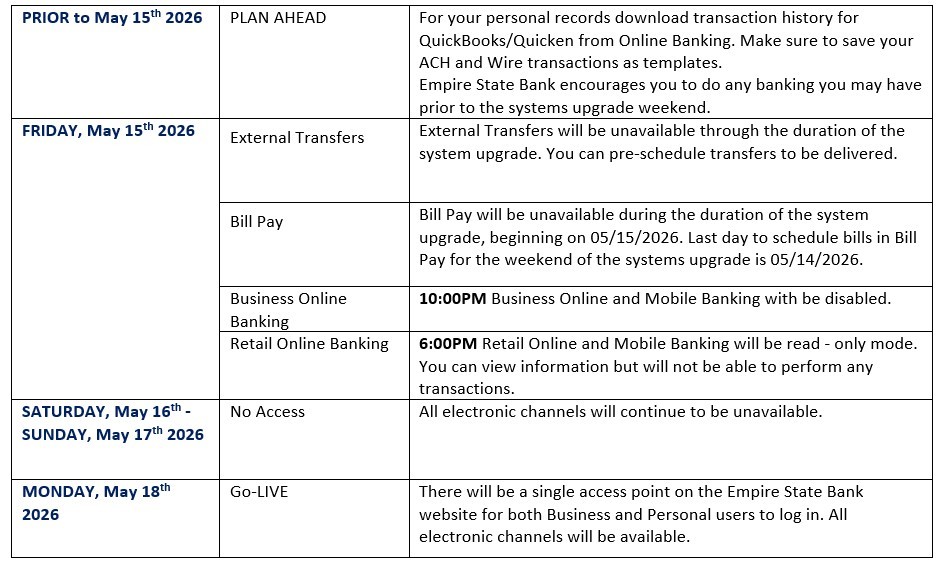
Click Image To View Key Dates:
Online Banking Log In Quick Reference::
Both Personal and Business customers will now have the convenience of logging in through a single login website and one Mobile App. You will no longer need to select from a business or personal banking drop down. Whether you manage Personal or Business accounts, you can simply sign in with your existing credentials and proceed directly to your respective personal or business profile.
Online Banking Access for Personal Banking:
You will Log-in using your existing username without any spaces. In the password field, you will enter your existing password without any spaces. Once entered, you will pe prompted to select a text, phone call or email to receive a one-time passcode to verify your identity. You will simply enter this passcode into the system and submit it to securely log in. Please ensure all your contact information is accurate and current for all your accounts.
Username: Existing username.
Password: Existing password.
If you do not remember your password, please use the “Forgot Password” feature.
Online Banking For Business Customers:
You will Log-in using your existing username without any spaces. In the password field, you will enter your existing password without any spaces. Once entered, you will pe prompted to select a text, phone call or email to receive a one-time passcode to verify your identity. You will simply enter this passcode into the system and submit it to securely log in. Please ensure all your contact information is accurate and current for all your accounts.
Username: Existing username. This is NOT case-sensitive and MUST have no spaces.
Password: Existing password.
If you do not remember your password, please use the “Forgot Password” feature.
Token Customers
All soft token (Digi Pass) users will need to download the new DIGIPASS App from Play Store or App Store. Customers will need to use their username and original password (not token+PIN) for first login. If you forgot your password, it can be reset via the Forgot Password feature. Once entered, you will be prompted to select a text, phone call or email to receive a One Time Passcode. Once verification is completed, you will be presented with instructions and prompted to Begin Activation of your new Soft Token. This is for all customers who currently use our cash management services.
Future Logins - Users must use their User ID & Password and will be prompted for their token at every login.

FI DigiPass (Orange App)
Cash Management:
-
Upon your first login to the Business Online Banking Cash Management Service, you will need to re-establish your DIGIPASS soft token. This security feature will be used for ACH and Wire Transfer transactions via Business Online Banking.
-
Existing ACH and Wire templates will be brought over to Business Online Banking if saved before May 15th, 2026. If a transaction currently does not have a template, the information will not migrate over. Detailed history of ACH and Wire transactions will not migrate over. For your personal records, you can export your ACH and Wire history before May 15th, 2026.
-
All future dated and/ or recurring ACH transfers or Wires must be re-established after May 18th, 2026
-
Business Remote Deposit Capture will continue to function with your existing credentials.
-
Check & ACH Positive Pay will continue to function with your existing credentials.
Training videos are available below to assist you with navigating through the newly designed system and using the new features.
Quickbooks/Quicken:
-
Intuit aggregation services will be interrupted for up to 5 business days.
Your Action Dates:
1st Action Date: 05/14/2026
2nd Action Date: 05/18/2026
The 1st Action date: A data file backup and a file transaction download should be completed by this date. Please make sure to complete the final download before this date since transaction history might not be available after the upgrade.
The 2nd Action date: This is the action date for the remaining steps in the conversion instructions. Please see the conversion instructions via our website at https://esbna.com/Business-Services . You will complete the deactivate/reactivate of your online banking connection to ensure that you get your current Quicken or QuickBooks accounts set up with the new connection. Please carefully review your downloaded transactions after completing the migration instructions to ensure no transactions were duplicated or missed on the register.
Intuit product users are encouraged to download a QFX/QBO file during this outage. The following services will not be operational during the outage:
· Quicken Win/Mac Express Web Connect/Quicken Connect
· QuickBooks Online (QBO) Aggregation
Download Our Latest Mobile App!:
Personal Mobile Banking Customers:
Will be prompted to update your current app upon launch
Business Mobile Banking Customers:
Will have the ability to download the new Empire State Bank Mobile application from the App Store and Google Store.


Need Help? Give Us A Call:
To help with any needs you may have during the upgrade,
you may contact your local banking center or call us at 845-451-7888.
Video Tutorials:


Frequently Asked Questions:
If you do encounter an error on your account, please contact us at 845-451-7888.
You will enter your existing username without any spaces. In the password field, you will enter your existing password without any space. Once entered, you will be prompted to select a contact method to receive a one-time passcode. Please ensure all your contact information is accurate and current for all your accounts.
You will enter your existing username without any spaces. In the password field, you will enter your existing password without any space. Once entered, you will pe prompted to select a contact method to receive a one-time passcode. Please ensure all your contact information is accurate and current for all your accounts.
Intuit aggregation services will be interrupted for up to 5 business days post go live.
Your Action Dates:
1st Action Date: 05/14/2026
2nd Action Date: 05/18/2026
The 1st Action date: A data file backup and a file transaction download should be completed by this date. Please make sure to complete the final download before this date since transaction history might not be available after the upgrade.
The 2nd Action date: This is the action date for the remaining steps in the conversion instructions. Please see the conversion instructions via our website at Business Services and Solutions | Empire State Bank You will complete the deactivate/reactivate of your online banking connection to ensure that you get your current Quicken or QuickBooks accounts set up with the new connection. Please carefully review your downloaded transactions after completing the migration instructions to ensure no transactions were duplicated or missed on the register.
Intuit product users are encouraged to download a QFX/QBO file during this outage. The following
services will not be operational during the outage:
· Quicken Win/Mac Express Web Connect/Quicken Connect
· QuickBooks Online (QBO) Aggregation
As we strive to provide you with the latest digital technology, our mobile banking app will look a little different to you. Beginning May 18th, 2026, you will see that there is now one app available in all app stores. You will log in with either your Business or Personal login credentials. Please follow the login instructions provided above.
Copyright © 2026 Empire State Bank. All rights reserved. Member FDIC. Equal Housing Lender.


| Get the ESB Mobile App for Personal bank 
|
| Get the ESB Mobile App for Business bank
|
| Get the ESB Mobile App for Personal bank 
|
| Get the ESB Mobile App for Business bank
|